Panasonic LUMIX SHX1 first look: Would I trade my hybrid camera for it?
 By Ryan Robert Rice · Published November 17, 2026 · Updated
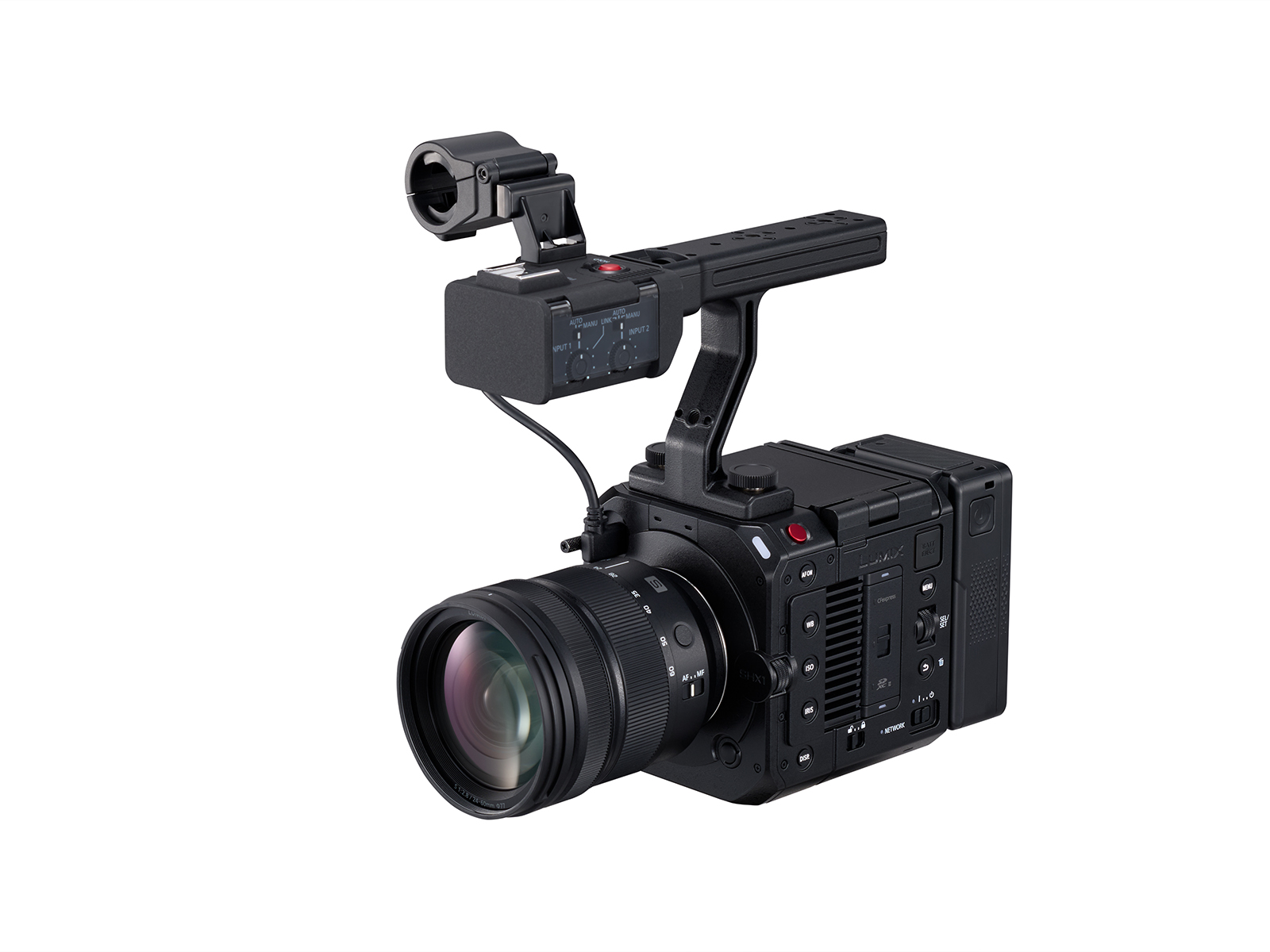
Panasonic just announced the LUMIX SHX1, a full-frame L-Mount camera built for video. If you already shoot with LUMIX glass, the big question is whether this camera solves a problem your S5IIX or S1II doesn’t. For the way I shoot, that comes down to what the job needs: a camera I can switch from photos to video on, or a dedicated video rig I can build around.
Sensor, dynamic range and color
The SHX1 uses a 24.1MP partially stacked full-frame sensor with an optical low-pass filter. Panasonic rates V-Log at 15 stops with Dynamic Range Boost enabled, or 14+ stops without it. Boost also restricts recording settings and increases rolling-shutter distortion. ARRI LogC3 comes installed. Official specifications · Conditions and limitations
Here is why that matters on a job: a bright window and a face inside a room can be far apart in brightness. More usable dynamic range can give the grade more room, but it cannot replace lighting or careful exposure. I would test that window-and-face scene before trusting a headline number. Likewise, I would compare a fast pan with Boost on and off before deciding which setting to use for a moving walkthrough.
An optical low-pass filter is meant to reduce false patterns in fine detail. Clothing, roof tiles and tightly spaced architectural lines are useful subjects to check. Log is also a starting point for color correction, not a finished look. Choosing a profile should follow the production’s color workflow; matching names alone does not guarantee matching footage.
Open gate, slow motion and recording formats
Panasonic lists open-gate 6K/30p and 5.1K/60p in 10-bit 4:2:0, plus 3.8K/48p in 10-bit 4:2:2. Blackmagic RAW offers 6K/24p open gate with a slight crop. There is also 4K/120p recording. Panasonic recording announcement
For a horizontal property video and a vertical Reel, the extra height of open gate gives the editor more choices. I would put framing guides on screen and keep the important action inside both versions. It will not rescue a shot where the subject is already pressed against the edge. For slow motion, 120 frames captured per second can play five times slower on a 24p timeline. That changes the light and shutter requirements, so I would reserve it for a deliberate detail shot rather than record an entire job that way.
| Workflow | Recording destination | What I would check |
|---|---|---|
| Blackmagic RAW | External USB SSD | Resolve workflow, cable security and approved drive |
| ProRes RAW / RAW HQ | Internal CFexpress Type B | Editing software compatibility and card capacity |
| Standard video | Depends on the selected format and media requirements | Whether the client needs RAW at all |
RAW can be useful when the grade needs flexibility, but it adds decisions around storage, backups and delivery. Before a paid shoot, I would record a short clip, import it into the actual edit system, apply the intended color transform and export a sample. That simple round trip is more useful than assuming every codec works equally well everywhere.
For SSD recording, Panasonic specifies compatible USB-C drives up to 2TB. Main-video recording to SSD cannot simultaneously duplicate to a card; an SD proxy is supported. A proxy is not a second full-quality master. Read the recording footnotes.
Autofocus and handheld stabilization
The camera combines 779-point Phase Hybrid AF with five-axis in-body stabilization and Dual I.S. 2 support. Panasonic’s AF and stabilization overview
For a solo interview, I would check whether focus stays on the intended eye when someone leans forward, turns away or gestures across their face. For a walkthrough, I would check transitions between a nearby doorway and the room beyond it. Those are different demands, so the same autofocus behavior may not suit both.
Stabilization helps with shake, but footsteps still move the camera through space. I would test a slow handheld walk against a balanced gimbal before leaving the gimbal behind. A locked interview frame, a slow push through a room and a long-lens detail shot each deserve their own setup.
Monitoring, timecode and audio
Connections include 12G-SDI, full-size HDMI and BNC timecode input/output. The body records 32-bit float audio through its 3.5mm input; the optional AU-XHU1 adds XLR connectivity. A top-mounted articulating monitor is built in. Connection specifications
This is the part that makes the camera interesting for a production rig. A separate monitor lets someone else watch composition while I operate. Timecode gives cameras and audio a common timing reference, which can make organizing a long interview easier. It still needs a setup and sync check at the start of the job.
32-bit float gives more freedom to adjust recorded levels later, but it does not fix a badly placed microphone, wind hitting a capsule or distortion before the signal reaches the recorder. I would still monitor with headphones and record a spoken test at the loudest expected level. For interviews, microphone placement remains a bigger decision than the file format.
Power, cooling and the complete rig
The body weighs about 984g and supports micro V-mount power. Panasonic advertises recording without a fixed time limit through 4K/120p within its operating temperature range. USB power requires suitable 100W equipment. Body and power details · Thermal and power conditions
That is the starting weight, not the weight I would carry all day. Add a lens, battery, grip, microphone, media and any mounting hardware before judging the setup. I would also check cable clearance when rotating the camera vertically. A tidy rig should let me change a battery or card without taking half the camera apart.
For long interviews, my rehearsal would include the actual recording mode, room temperature, power source and microphone position. I would listen for fan noise and leave the cooling path clear. “Unlimited” does not mean unlimited battery, storage or operation in every environment.
Announced accessories and later features
The AU-LPU1 Live Production Unit and additional Tilta control support are planned for the first half of 2027. Treat those as future additions, not launch-day guarantees. Panasonic’s roadmap
I would buy around the work the camera can do when it arrives. If a promised feature is essential to a particular job, I would wait for its release and a compatibility check before committing the camera to that production.
Would I replace my hybrid camera?
For a job that needs both finished photos and video, I would keep a hybrid in the kit. For a video-only interview, a longer production or a rig shared with other crew members, I would rent the SHX1 and test the complete workflow. The decision should come from time saved on set and in the edit, not simply from owning a more elaborate camera.
Panasonic’s announced U.S. price is $4,699.99 for the body, or $5,499.99 with the AU-XHU1 handle and AU-GRP1 grip, with U.S. availability expected in January 2027. U.S. price and availability. This is a specification-based first look, not a hands-on review. Details checked November 18, 2026.