MAONO PD500W: a wireless podcast microphone with a useful backup plan
 By Ryan Robert Rice ·
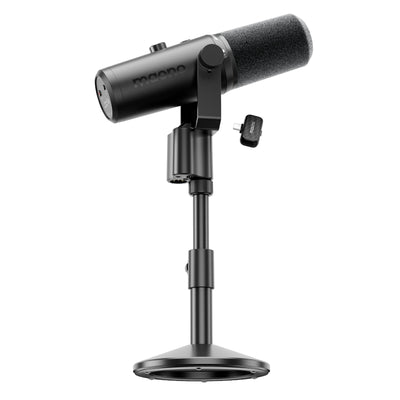
A podcast microphone normally sits in one place with a cable running back to a computer or interface. The MAONO PD500W adds another option: wireless operation, alongside USB-C, XLR and recording inside the microphone itself. That makes it worth investigating for interviews, changing desk setups and creators who want a local copy of an important conversation.
The microphone Ryan shared is the PD500W, Amazon ASIN B0HG22Z8KV. This is a researched buying guide, checked November 18, 2026, using MAONO’s product information and instructions. Ryan has not said he owns or has tested this microphone. Nothing here should be read as a firsthand sound-quality or wireless-range test.
As an Amazon Associate I earn from qualifying purchases.
View the MAONO PD500W on Amazon — paid link. Check the selected package and included receiver, stand and microphone count before buying; the number of people supported is not the number of microphones included.
What makes the PD500W different
MAONO describes four ways to work: internal recording, wireless, USB and XLR. The full PD500W has 32GB of built-in storage and supports 32-bit float internal recording. That combination is the reason to look closely at it rather than treating it as another USB microphone with a different shape.
The model names need attention. MAONO’s comparison distinguishes the PD500W from the PD500W Lite and PD500X. The Lite retains wireless but omits the full model’s 32-bit float internal recording; the PD500X is a different wired option. A lower price on a similarly named product may reflect a materially different feature set.
Wireless is useful when it changes the setup
For a conversation filmed away from your usual desk, fewer cables crossing the table can make positioning easier. It can also help when the computer needs to sit outside the shot. That does not mean wireless will improve the sound simply by removing the cable.
MAONO’s FAQ says one receiver supports up to two microphones. For two-person recording, check that you have the necessary microphones and the right receiver for your device. Then make a short recording with each person speaking separately. Listen back to establish what your recording application receives and how you will edit the speakers. Do that before an interview that cannot be repeated.
I would still choose wired USB for a fixed desk if it provides the simplest reliable setup. Wireless is most compelling when it solves placement or cabling friction that you actually encounter.
What 32-bit float does—and does not—buy you
Think of 32-bit float as flexibility in the recorded file, not permission to stop listening. It does not repair a voice obscured by clothing noise, an unsuitable microphone position or distortion that happened before the signal was captured cleanly. Record a realistic loud moment during setup, not only a quiet “one, two” check.
MAONO’s user guide says the internal file is mono and that its 32-bit float option saves the original, unprocessed recording. Processed internal files are not available at that bit depth. That matters if you want both a polished live feed and an editable local original: understand which path contains processing before assuming both copies will sound the same.
The best reason to use local recording is that it gives you another recording path to manage. It is not a guarantee against every possible failure. Verify the file exists, plays correctly and contains the full conversation before packing away or formatting anything.
USB and XLR are different signal paths
USB provides a direct connection to a compatible computer. XLR connects the mic to an audio interface or mixer. MAONO identifies the PD500W as a dynamic microphone that does not need phantom power for XLR operation.
The important limitation is that its XLR output is unprocessed: onboard digital controls and sound effects do not change that analog output. If you are relying on a digital mute or a software noise-reduction setting, do not assume it also governs an XLR feed. Establish the actual mute and level controls in your interface or mixer, and monitor the path that is being recorded.
That distinction can be useful rather than inconvenient. A clean analog feed gives an engineer control downstream. It simply means “the microphone has noise reduction” is not a complete description of every connection mode.
Noise reduction and auto gain: use a light touch
The user guide offers preset and custom noise reduction, manual or automatic gain, and additional processing. It also says enabling automatic gain disables the compressor and limiter functions. More checked boxes do not necessarily produce a better result, and some settings cannot be combined.
I would start by improving placement and reducing obvious room noise, then compare a short untreated recording with a lightly processed version. Listen to quiet word endings and pauses as well as the loudest phrases. If processing distracts from the voice, back it off. That is a suggested audition process, not a claim that the PD500W produces a particular artifact.
A recording routine that makes the backup worthwhile
Before recording, charge the equipment, confirm free storage and select the desired internal file format. Check that the local recorder has actually started. A spoken slate or clap can help identify and align the audio later when you have separately recorded video.
After the session, stop recording and follow MAONO’s USB-drive export procedure. Copy the audio, play representative sections and keep a second copy before clearing the microphone. The guide describes a loop-recording option that overwrites earlier files when storage fills; choose that behavior deliberately rather than discovering it after an important interview.
This extra file-management step is a real tradeoff. If you will never retrieve or use the local recording, the feature may not justify paying for the full model.
Compare it with the Shure MV7+
The Shure MV7+ is a dynamic microphone with USB-C and XLR connections, plus digital tools including a real-time denoiser. It is a relevant alternative for a creator who primarily records at a desk and wants to compare a different software and monitoring experience.
I would compare the microphones using the same room, speaking position and final playback level. Brand reputation and an impressive feature list cannot tell you which voice you will prefer. The PD500W’s distinctive buying case is its wireless and internal-recording workflow; if those do not matter, a wired comparison deserves equal attention.
Search Amazon for the Shure MV7+ — paid link.
Compare it with the RØDE PodMic USB
The PodMic USB is another dynamic USB/XLR alternative, with direct computer use or connection through an interface. Make sure the listing says PodMic USB: the original PodMic is an XLR model and needs the appropriate interface to reach a computer.
For a fixed workstation, compare the full cost of the microphone, mounting solution and any required interface. I would favor the setup that is easy to position and consistently record with over paying for features that remain unused. None of these model descriptions establishes a universal sound-quality winner.
Search Amazon for the RØDE PodMic USB — paid link.
Who should shortlist the PD500W?
The PD500W makes the most sense for a creator who wants to change recording locations, reduce table cabling or keep an internal original alongside another recording path. It is less persuasive when all you need is a dependable single-microphone desk setup and you will not use wireless or retrieve the onboard files.
My buying question would be simple: which of these extra capabilities will I use on the next few recordings? If the answer is clear, compare the full PD500W package. If it is not, audition the wired alternatives and spend the difference where your production needs it most.