DJI Mavic 4 Pro: a flagship drone for professional creators
 By Ryan Robert Rice ·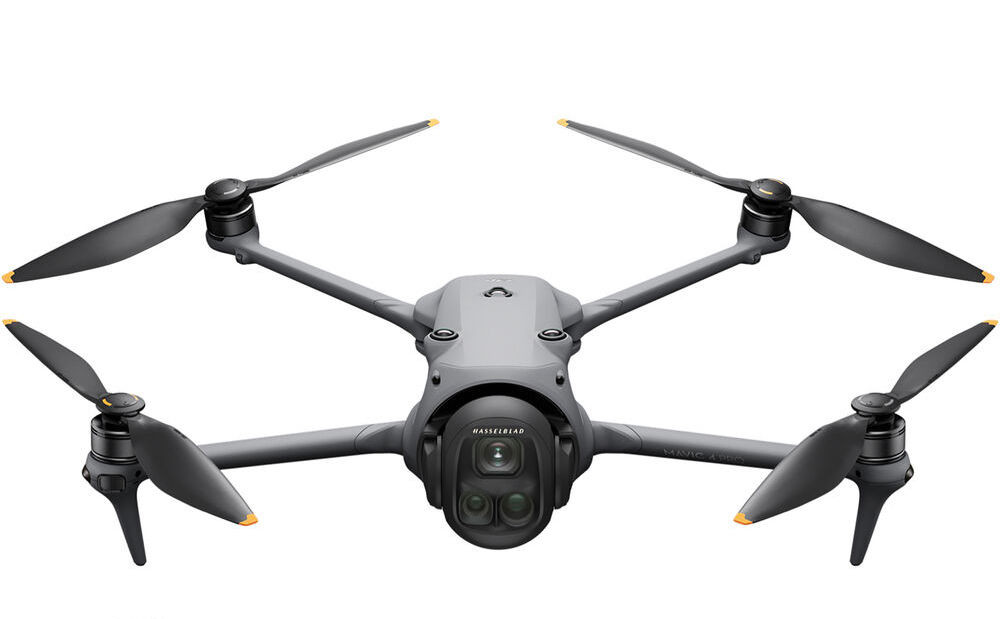
The DJI Mavic 4 Pro is the flagship option in this gear journal for creators looking beyond a compact travel drone. Its three-camera system is the main attraction: more framing options can help build an aerial sequence with a stronger sense of place, detail and scale.
This guide looks at the Mavic 4 Pro Fly More Combo with DJI RC 2 in the linked listing. It is a buying overview based on published product information, not a claim that I have personally flight-tested this model.
Affiliate disclosure: As an Amazon Associate I earn from qualifying purchases. Buying through these Amazon links may earn me a commission at no extra cost to you.
Why consider a flagship camera drone?
For professional photo and video work, the useful question is what a larger system lets you deliver. Think about the project: do you need a wide establishing view, tighter details from a different perspective, or a sequence that connects those shots? A multi-camera drone gives you more options to plan around.
Those options still need a purpose. A good aerial sequence is more than a collection of dramatic movements. Start with the story, decide what each shot contributes, and choose your framing before choosing a flight move.
What stands out in the Mavic 4 Pro listing
The linked package lists a tri-camera aircraft with a 100MP 4/3 CMOS Hasselblad camera. It also lists the DJI RC 2 controller, three batteries and a charging hub. Check the selected package and seller’s contents before ordering, since other bundles may include different equipment.
The advertised maximum flight time is 51 minutes under test conditions. Treat that as a specification, not a promise of usable shooting time on every flight. Wind, movement, battery condition and your return reserve all affect how much filming you can plan.
Build a sequence with intention
A practical way to approach a location is to think in three shots. First, establish where the viewer is. Next, isolate a detail that gives the scene character. Finally, choose an angle or movement that brings the sequence to a natural finish.
Different fields of view can help with that variety, but simply switching cameras does not create a finished story. Keep the light, movement and edit in mind so the shots feel connected. For paid projects, plan the deliverables with the client before spending flight time collecting footage.
Mavic 4 Pro or Mini 5 Pro?
The Mini 5 Pro in my earlier article is worth considering when a compact kit is the priority. The Mavic 4 Pro is the direction to explore when the larger camera system and additional framing options better match your production needs.
Compare the complete kit, not just the aircraft. Think about carrying space, batteries, charging, your editing workflow and the shots you expect to deliver. A larger purchase only makes sense when its advantages matter to your work.
What to check in the Fly More Combo
- Controller: this listing specifies DJI RC 2; confirm that exact option.
- Contents: check the batteries, hub and other included accessories on the live listing.
- Support: review the seller, regional warranty coverage and return policy.
- Workflow: confirm recording formats, media requirements and compatibility with your editing setup.
- Location: check the requirements and operating conditions for your intended flights.
Who should put it on their shortlist?
Photographers and filmmakers who can make use of multiple aerial perspectives should take a closer look. It is especially worth comparing when you are building a dedicated production kit and want to understand what a flagship system adds.
The goal is a camera tool that serves your work. If your needs are mostly casual travel clips, start with the smaller option. If the larger system solves a real production need, the Mavic 4 Pro deserves a place in the comparison.
Explore my aerial video portfolio or browse the gear journal.